 By admin
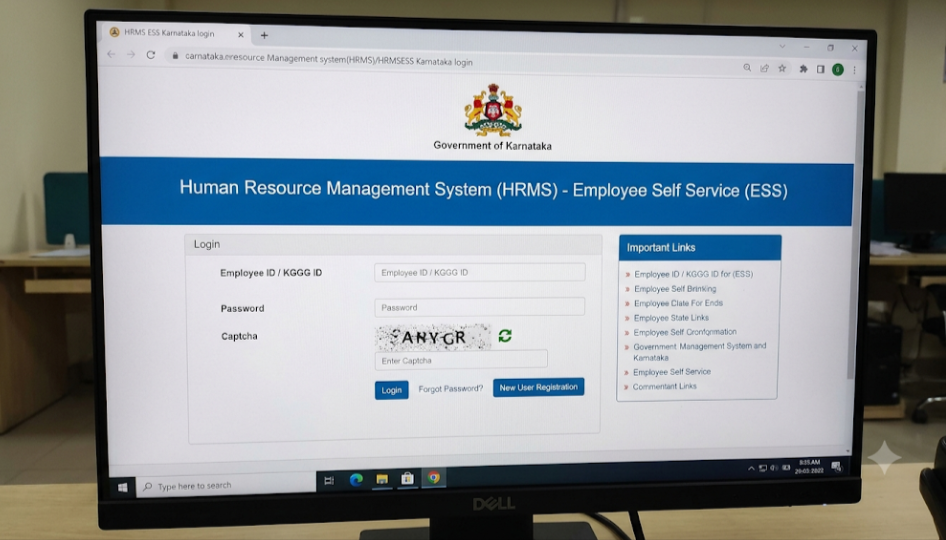
HRMS ESS Karnataka is the Employee Self Service (ESS) portal for Karnataka State Government employees. It lets staff see their own pay, service and leave details online instead of asking their office. Login uses your KGID number, the government insurance ID printed on your payslip, along with a password and OTP verification.
HRMS ESS Karnataka : Detailed Guide
| Item | Details |
|---|---|
| Run by | Government of Karnataka (HRMS; Finance Department and Centre for e-Governance) |
| Main HRMS portal | hrms.karnataka.gov.in |
| ESS portal | hrmsess.karnataka.gov.in |
| HRMS 2.0 portal | hrms2.karnataka.gov.in (reported for enrolled departments only) |
| Mobile app | “HRMS2 ESS” on Google Play, per guides |
| Login ID | KGID number |
| First-time step | “New User”: KGID number plus registered mobile number |
| Helpline | 080-22251160 (CeG), as listed in a guide; verify before use |
| Key services | Pay slip, service register, leave balance, loans, deductions, insurance, profile |
What Is HRMS ESS Karnataka?
The state’s HRMS holds the Electronic Service Register (ESR), the digital version of an employee’s service book, and supports payroll and other personnel work across departments. The ESS portal is the employee-facing part of that system. Guides describe it as the place where employees view their pay slip, service register, leave balance, ticket status, loan or advance details, deductions and insurance details.
Karnataka’s HRMS began as a computerised personnel system for lakhs of employees across the state. A newer HRMS 2.0 is being developed with a technology partner and adds modules such as employee self-service, retirement management, annual performance management and a service register with core history, with integrations across many departments.
Because there are several portals, ask your DDO which one applies to you. Most employees are reported to use the main HRMS and ESS sites, while departments enrolled in HRMS 2.0 use hrms2.karnataka.gov.in.
HRMS ESS Karnataka Portal Login: Step-by-Step Guide
First-time registration
- Open the official ESS portal at hrmsess.karnataka.gov.in. Type the address yourself or use a bookmark.
- Click New User.
- Enter your KGID number and your registered mobile number. The mobile number must be the one linked to your service record.
- Verify the OTP sent to your phone.
- Create your password and complete registration.
Regular login
- Go to the ESS login page.
- Enter your KGID number as the username.
- Enter your password.
- Complete the OTP step if prompted.
- Open the dashboard and choose a service.
Where do I find my KGID?
It is printed on your payslip, and also available from your office ID card, your service book or your DDO.
Wrong employee type or “Invalid credentials”?
The portal may ask you to select your employee category. Choose the right one, and ask your DDO if you are unsure whether you belong to HRMS or HRMS 2.0.
Mobile number not registered? Ask your DDO to update it in the service record first.
Features of HRMS ESS Karnataka
- Pay slip: choose the month and year, search, then view or print.
- Service register book (ESR): your complete service history in digital form.
- Leave balance: view balances such as EL and HPL, along with other leave status.
- Loan and advance details: status of loans or festival advances.
- Deduction details: a breakdown of salary deductions.
- Insurance details: KGID, GPF, LIC and other insurance information.
- Ticket status: track your raised requests.
- Profile: basic and personal details.
- Leave application: guides describe applying for leave from the dashboard.
- Mobile access: an HRMS2 ESS Android app is listed for HRMS 2.0 users.
Not every service appears for every user, so check your dashboard.
Benefits of HRMS ESS Karnataka
- 24×7 access to payslips and records from home
- No office visits for routine information
- Bank-ready documents such as payslips for loan applications
- Transparency over pay, deductions, leave and service history
- One KGID login that is also used across other state portals, per guides
- Less paperwork for both staff and offices
FAQ
What is the official HRMS ESS Karnataka website?
hrmsess.karnataka.gov.in for self-service, with the main HRMS at hrms.karnataka.gov.in.
What is my username?
Your KGID number.
How do I register?
Click New User, enter your KGID number and registered mobile number, verify the OTP, and set a password.
How do I download my pay slip?
Click Pay Slip, select the month and year, search, then view, download or print.
What if my mobile number has changed?
Ask your DDO to update it in your service record.
What is the difference between HRMS, HRMS 2.0 and ESS?
HRMS is the main personnel system, HRMS 2.0 is the upgraded version for enrolled departments, and ESS is the self-service portal for employees. Confirm with your DDO which applies.
Who do I contact for help?
Your DDO or HR section first. A guide lists a CeG helpline at 080-22251160.
Is it safe?
Use only the official addresses, never share your password or OTP, and log out on shared devices.