 By admin
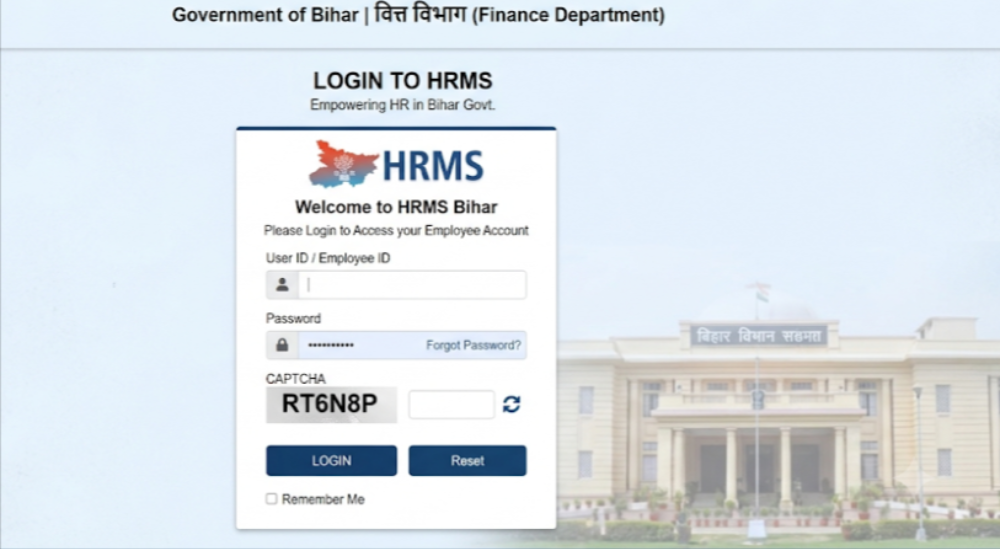
HRMS Bihar is the online Human Resource Management System for Government of Bihar employees, found at hrms.bihar.gov.in. Employees use it to check salary details, leave records, GPF statements and the e-service book without visiting an office. Teachers, clerks, health workers and other regular state employees are among its users.
HRMS Bihar: Detailed Guide
| Item | Details |
|---|---|
| Owner | Government of Bihar (guides link it to the Finance Department) |
| Official portal | hrms.bihar.gov.in |
| Users | Bihar state government employees |
| Login | Employee code (or HRMS ID), password and captcha |
| Credentials issued by | Your DDO (Drawing & Disbursing Officer) or office |
| Password reset | “Forgot Password” with employee code, registered mobile and OTP |
| Main services | Salary slip, leave, GPF, service book, profile |
| Language | Hindi/English toggle reported |
| Related portal | CFMS / E-Nidhi V2 for pay bills, which is a separate login |
What Is HRMS Bihar?
HRMS Bihar is a digital platform for personnel and service records of state government staff. The Bihar government’s e-governance profile lists payroll, loans and service book management among its modules. For employees, the practical benefit is simple: one place to see your pay, leave and service history.
A caution: some third-party sites mix up HRMS Bihar with the central e-HRMS portal (e-hrms.gov.in). They are different systems, so use the address your department gives you.
HRMS Bihar Portal Login: Step-by-Step Guide
- Open the portal. Type hrms.bihar.gov.in into your browser, or use a bookmark.
- Click Login (top right on the home page).
- Enter your employee code (or HRMS ID) and password.
- Solve the captcha.
- Click Login to reach your dashboard.
- Explore the menu. Typical options include Payroll, Service Book, Leave and GPF.
If features do not load on a phone, switching the browser to desktop view is reported to help.
Forgot Password or First-Time Login?
First-time login
You generally cannot self-register. Your DDO or office completes your registration in the system, after which you receive your user ID and a temporary password on your registered mobile number or email. Log in, then change the password immediately.
If you get “Invalid Credentials” on your first try, the likely cause is that your data has not yet been set up or linked. Ask your DDO to confirm your employee code and activation. Teachers can also ask their BEO. Note that guides say some teacher categories (for example, niyojit and niyamit) may have different IDs, so confirm yours.
Forgot password
- On the login page, click Forgot Password.
- Enter your employee code and registered mobile number.
- Enter the OTP you receive.
- Set a new password.
If your mobile number is not registered, ask your DDO office to update it first.
Features of HRMS Bihar
- Salary slip: view or download monthly slips as PDF, reported under Payroll or Reports.
- Annual salary statement: yearly pay summary for loans and tax filing.
- Leave management: leave records and balance.
- GPF statements by financial year.
- e-Service book: service history, including increments and pay revision details.
- Profile: personal details linked to your service record.
- Hindi and English options.
Features visible to you depend on your department and what has been enabled.
Benefits of HRMS Bihar
- Anytime access to pay and service data.
- Less paperwork and fewer office visits.
- Quick payslip access for bank loans and income tax.
- Transparency in leave, GPF and service records.
- Less administrative load on HR and accounts staff, which is a stated aim of the system.
FAQ
What is the official HRMS Bihar website?
hrms.bihar.gov.in.
Who can use it?
Regular Bihar state government employees whose records are set up by their office.
Can I register myself?
Usually no. Credentials are provided through your department or DDO.
Login says “Invalid Credentials”. What now?
Check your employee code and password, then ask your DDO to confirm your data and activation.
How do I download my salary slip?
Log in, open Payroll (or Reports), choose Salary Slip, select month and year, then view or download. Some guides say pay bills are also available through CFMS / E-Nidhi V2, a separate login.
Is HRMS Bihar the same as e-hrms.gov.in?
No. e-hrms.gov.in is the central government portal.
Can I use it on mobile?
Yes, through a browser. Use desktop view if features do not load.
Is it safe?
Use only the official address, never share your password or OTP, and log out on shared devices.